Smart Ring Frequently Asked Questions (FAQ)
Q. After downloading the APP, the Ring Bluetooth information cannot be found?
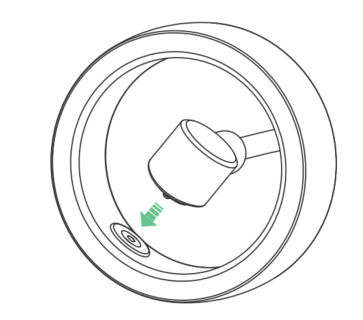
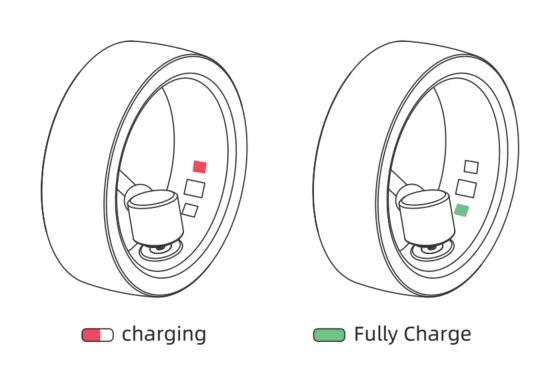
A. The Ring is turned off by default and needs to be charged and activated for the first use. When charging is activated, the charging indicator on the Ring lights up red, indicating that the Ring is turned on for the first time. Please charge the device for more than an hour until the charging indicator on the phone lights up green.
Q. Why does it show that the Ring is not connected every time I open the APP?
A. To save system resources, some mobile phone systems close apps in the background for which users have not set up background protection. Therefore, please read the background protection guide and activate the APP background protection function. It still shows "Disconnected." The Ring may be turned off due to low power. Please charge it before reconnecting.
Q. Why can't the Ring be charged?
A. There may be too much dust in the charging port, preventing the charging process. You can first try cleaning the charging port.
1. Use tools for cleaning
a. Cotton swabs: Cotton swabs are a very handy cleaning tool that can remove dust from the charging port. Simply twist the cotton swab gently to remove surface dust.
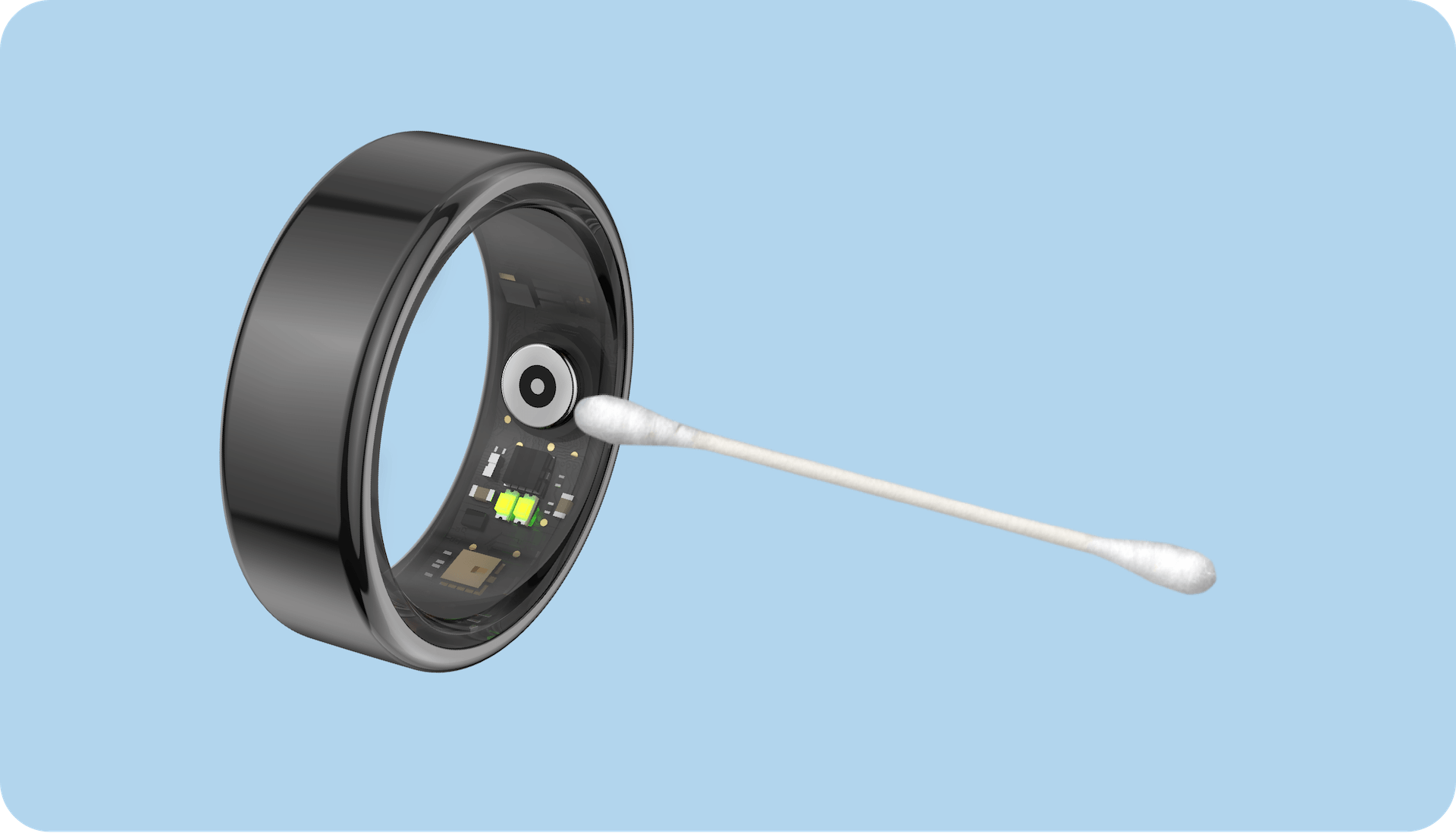 b. Toothpicks: If there is a lot of dust around the charging port, you can clean it with a toothpick. However, be careful not to use toothpicks that are too thick to avoid damaging the charging port.
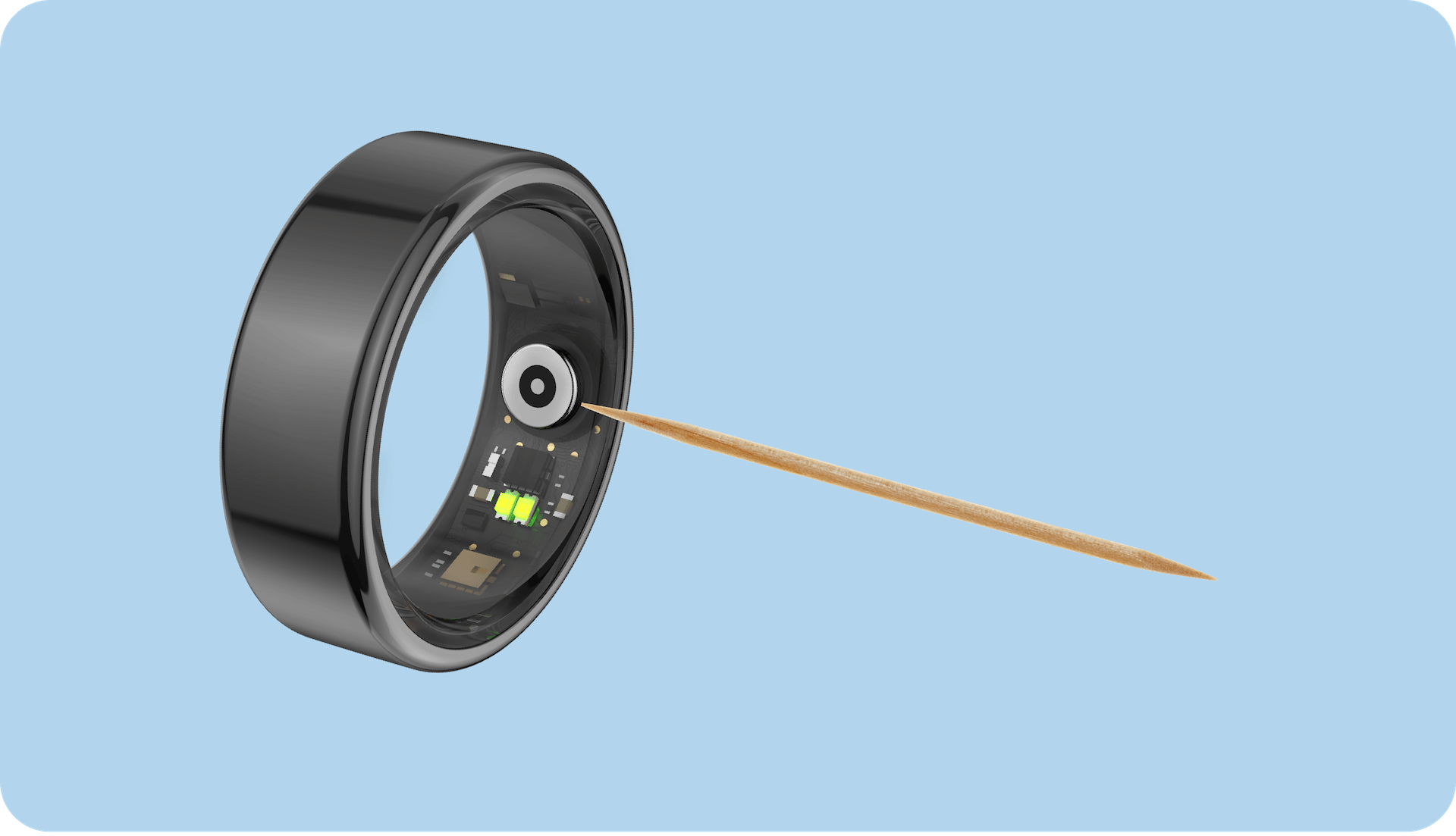
2. Cleaner If the dust in the charging port is stubborn, you can clean it with some cleaning solution. However, be sure to choose a mild cleaner to avoid damaging the Ring. At the same time, when using cleaning solutions, pay attention to the amount and method to avoid corrosion or damage to the charging port. 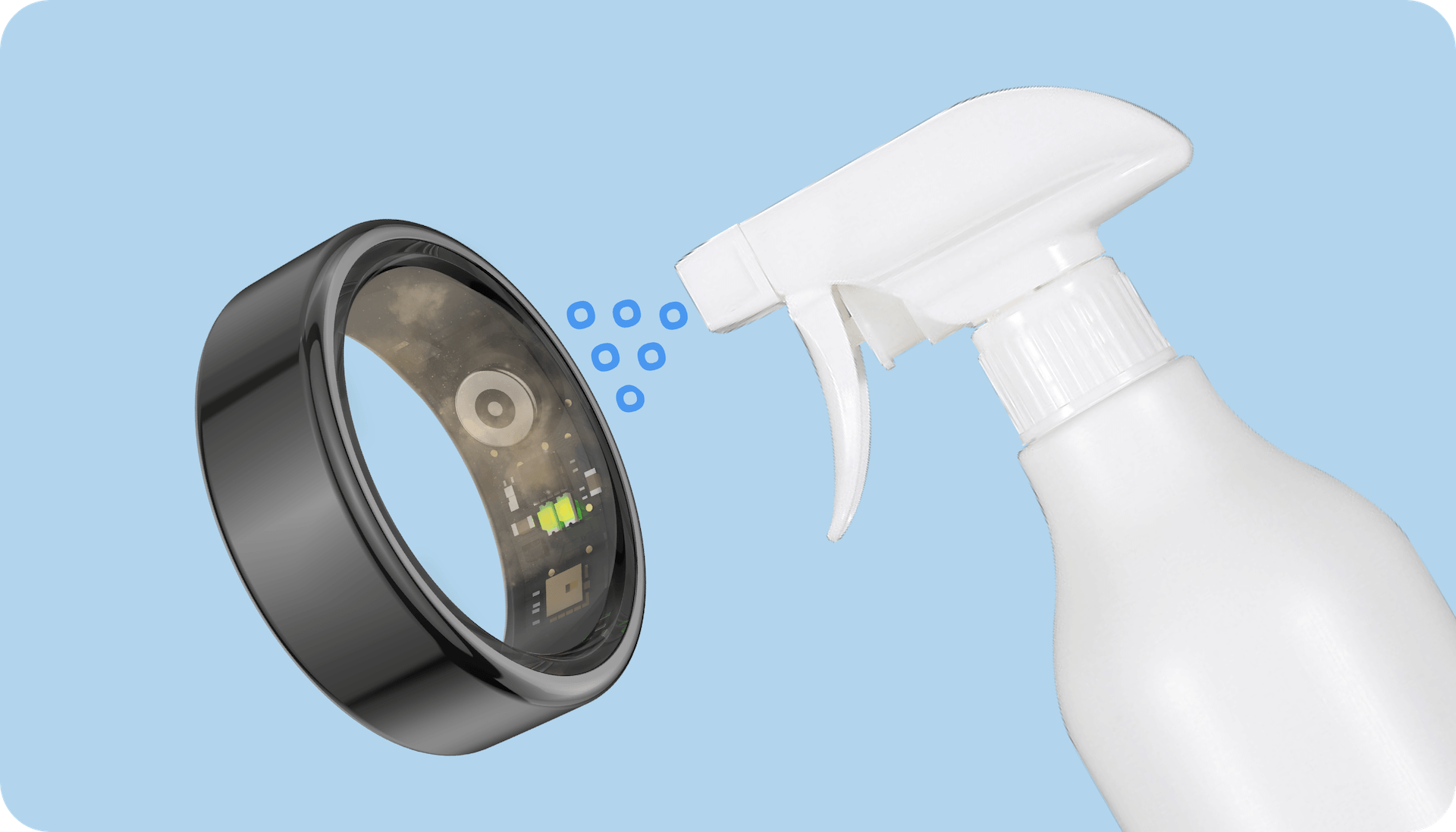
3. Precautions: Pay attention to the method and intensity when cleaning. Do not use too rough methods to avoid damaging the charging port. If the charging port is damaged or cannot be cleaned, it is recommended to seek help from customer service.
Q. How do I charge the Ring?
A. Use a compatible mobile phone charger or a computer USB interface to connect the charging cable or charging dock to charge the Ring. When the Ring is charging, the red light on the Ring indicates that it is charging, and the green light indicates that the battery is fully charged.
Q. Sleep data cannot be synchronized or is inaccurate?
A. (1) If you switch to sleep mode without wearing the Ring, the APP will not generate sleep data after synchronizing the Ring with the APP.
(2) The Ring records sleep data at night and cannot record sleep during the day.
(3) The user wears the Ring, starts recording within 30 minutes after lying down (deep sleep, light sleep, awake state, etc.), and ends sleep monitoring after getting up.
(4) All sleep records will be displayed on the sleep interface of the APP after the Ring and the APP are synchronized.
Q. There is a discrepancy between the sleep onset and wake-up times in the sleep log and personal feelings.
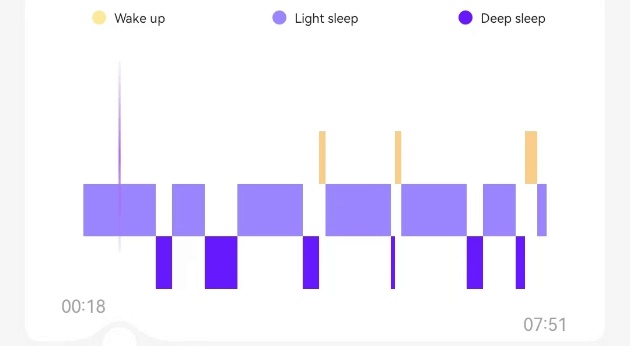
A. The sleep onset and wake-up time are characterized by changes in the physiological properties of the human body when falling asleep and waking up. The sleep state is detected by the sensor inside the Ring, and there may be some temporal deviation from your actual feelings.
Q. There will be a waking state in the middle of the sleep data.
A. The human sleep process consists of various sleep states such as light sleep, deep sleep, and wakefulness. In the waking state, human body awareness is still very vague for most people, and users may not be aware of their waking state, leading to personal feelings and Ring detection recording any deviations between the data.
Q. Is lying down and playing with the phone recognized as sleeping?
A. Sleep detection uses sensors on the Ring to recognize human activity characteristics. If the user remains in the same position for a long time, it may be recognized as falling asleep.
Q. Why doesn't the Ring start counting steps when I begin to walk?
A. To reduce daily activities of the user, such as typing on the keyboard, playing poker, and other more common hand activities, the Ring is set to an initial value of 10. When the number of steps reaches 10 consecutive steps, the Ring officially starts counting steps, and at the same time, the real-time step count changes in the main interface of the APP.
Q. Under what circumstances are data automatically connected and synchronized?
A. After the user completes the first Ring binding and reopens the APP, the Ring automatically connects to the APP and starts synchronizing data. The user does not need to perform any operations at this time. If the connection fails, please charge it and check again if it can connect to the APP and synchronize data.
Q. How do I manually connect and synchronize data?
A. Click the "Synchronize" button in the upper right corner of the APP, and the current data of the Ring will be automatically synchronized.
Q. Can I wear the Ring while showering?
A. Yes, the Ring is 5ATM waterproof. However, try not to use it in water in complex environments (e.g., hot springs, seawater). If the Ring comes into contact with seawater, please rinse it with fresh water as soon as possible to avoid corrosion of the metal material on the Ring due to the salt in seawater, which can lead to poor contact at the charging position of the Ring.
Q. What is the ambient temperature of the Ring?
A. The normal operating ambient temperature of the Ring is -10~+45℃ (14~113℉). If it is stored or worn outside the normal operating temperature range for an extended period, the lifespan and reliability of the Ring may be affected, and normal use of the Ring may be impaired.
Q. Cannot connect after the last firmware upgrade?
A. After the firmware is updated, the APP synchronizes the historical data of the device with the server, which takes about 3–5 seconds. You need to wait until the data synchronization is complete before you can connect to the Ring.
Q. In which direction should the Ring be worn correctly?
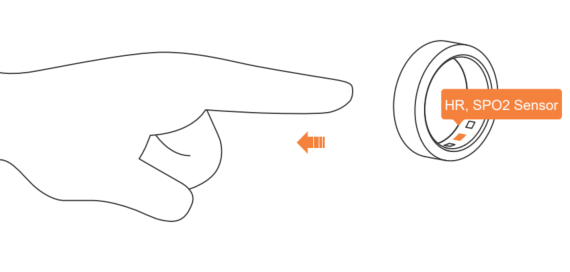
A. For optimal performance and accuracy, it is recommended to wear the Ring on the index finger of your non-dominant hand. If you wear it on the middle or ring finger, the heart rate sensor should be placed on the palm side, and the Ring should fit snugly against the skin and comfortably at the base of the finger. When wearing, try to keep the inside of the Ring dry to prevent sweat and other liquids from penetrating the skin of the finger-wearing area for an extended period, which can cause skin damage.
Q. Do historical data get lost if the Ring is lost or after uninstalling and reinstalling the APP?
A. If you uninstall and reinstall the APP, the data stored locally in the APP will be lost. After logging in, the Ring data will be synchronized and stored on the cloud server. Losing the Ring or uninstalling and re-downloading the APP will not affect the cloud server data. You can log in again with the same account to re-download and view the historical data stored in the cloud.
Q. How do I use the camera function?
A. Keep the Bluetooth connection between the Ring and your phone; shake the hand wearing the Ring to take the photo. PS: Follow the APP instructions to call the system camera.
Q. Why doesn't the APP display the health index?
A. The health index is derived from a comprehensive evaluation of the data collected by the Ring regarding sleep, movement, stress, heart rate, and blood oxygen. Among these, sleep data is the most fundamental data. If the wearing time is too short or sleep data is missing, the health index cannot be generated. It is recommended to continue wearing the Ring to unlock your health index.
Q. What is your activity score? Is your activity score below, in the middle range, or above the average of your age group?
A. The activity score ranges from 1 to 100 and is a comprehensive indicator of your activity today. The score varies by age group.
- 85-100 points: Excellent
- 75-84 points: Good
- 60-74 points: Moderate activity
- 0-59 points: Low activity
Q. Activity score
A. Total number of steps and daily steps
Daily steps are an indicator of your daily physical activity. The optimal number of daily steps depends on your age, body composition, fitness level, and willingness to perform. It is recommended to achieve at least 8000 steps daily. However, if you exercise, you can reduce the step count slightly. A higher step count is not always better, as too many steps can lead to potential strain on the knees and ankles. Therefore, it is recommended...len, keep the step count between 8000 and 15000.
Q. Total calories burned
A. The total number of calories refers to the total amount of energy you burn in a day, including the calories you burn throughout the day, whether during activity or at rest. Tracking your total burn rate and comparing it with your historical data can help you adjust your calorie intake and maintain a healthy weight. Although exercise increases your daily calorie burn, most of your total burn comes from the calories you burn at rest, also known as your Basal Metabolic Rate (BMR). The device starts calculating your total burn rate at midnight and estimates your BMR. This value continues to be calculated throughout the day, and all the calories you burn through your activities that day are added to your total.
Q. Sleep efficiency
A. Sleep efficiency is the ratio based on the assessment of actual sleep time compared to the total time spent in bed (the time spent in bed trying to sleep). It is usually expressed as a percentage. If a person's sleep score is high (for example, 80–100 points), it means they perform well in terms of falling asleep, sleep depth, sleep duration, and wake times. This indicates that the person falls asleep quickly, achieves sufficient sleep depth, has enough sleep time, and feels good upon waking. Together, these factors show that the proportion of actual sleep time to total time in bed is high, indicating high sleep efficiency. For adults, a sleep efficiency of over 85% is considered a sign of uninterrupted and continuous sleep.
Q. Sleep quality
A. The sleep score corresponds to sleep quality and is categorized as follows:
- Below 60 points (poor): This may indicate that your sleep quality is poor. It is recommended to establish a regular sleep rhythm.
- 60-75 points (average): Sleep quality may be at an average level, but there is still potential for improvement.
- 75-90 points (good): Keep it up! This helps maintain good sleep quality.
- Over 90 points (excellent): Please maintain this regular lifestyle. This is key to achieving excellent sleep quality.
Q. Heart rate during sleep
A. The heart rate during sleep undergoes a series of regular changes closely related to the various sleep stages and the body's physiological regulatory mechanisms:
- When transitioning from wakefulness to sleep, the heart rate usually slows down gradually.
- After entering light sleep, the heart rate remains slightly lower than in the waking state.
- In deep sleep, the phase of intense physical and mental recovery, the heart rate decreases further.
- In REM sleep (Rapid Eye Movement), the change in heart rate is more complex. Generally, the heart rate may increase compared to deep sleep.
- When you wake up in the morning, the heart rate begins to accelerate again.
It is important to note that the normal range of heart rate during sleep can vary individually and is influenced by various factors such as age, health status, physical fitness, and medication use. For example, the heart rate during sleep may be slightly higher in older individuals than in younger ones, while athletes may have a lower heart rate during sleep due to better heart function.
Q. Blood oxygen during sleep
A. Blood oxygen during sleep is an important indicator of sleep quality and overall health. Due to slower breathing, sleep quality, sleep position, and advancing age, there is often a decrease in blood oxygen during sleep.
- Falling asleep phase: When transitioning from wakefulness to sleep at the beginning, the body gradually relaxes, breathing becomes relatively even, and blood oxygen saturation usually remains within the normal range.
- Light sleep: In this phase, the body's metabolic rate slightly decreases, and breathing remains relatively regular.
- Deep sleep phase: The body is in a state of deepest recovery, the metabolic rate decreases further, breathing becomes calm and deep, and blood oxygen saturation may slightly increase.
- REM sleep (Rapid Eye Movement): Brain activity is relatively high, breathing may become somewhat irregular, but blood oxygen saturation usually remains within the normal range.
- Physiological factors: With increasing age, the body's functions gradually decline, including respiratory functions. The body position during sleep can also affect breathing and blood oxygen levels.
Q. HRV during sleep
A. Heart Rate Variability (HRV) during sleep reflects the regulation of the heart by the autonomic nervous system.
- Falling asleep phase: As the body gradually transitions from wakefulness to sleep, the HRV value usually shows an increase.
- Light sleep: During light sleep, HRV remains at a relatively high level.
- Deep sleep phase: Deep sleep is the phase of intense physical recovery and repair, during which HRV remains at a high level.
- REM sleep (Rapid Eye Movement): HRV during REM sleep is more complex.
- Age: With increasing age, HRV usually gradually decreases. Older individuals may have lower HRV values during sleep than younger individuals. This may be related to the deterioration of the autonomic nervous system's function and the reduced ability to regulate the heart.
- Lifestyle: Regular exercise can increase HRV during sleep. Individuals who engage in endurance sports over the long term have improved autonomic heart regulation. In contrast, unhealthy lifestyle habits can decrease HRV.
Q. Skin temperature during sleep
A. Skin temperature during sleep undergoes a series of changes closely related to sleep stages, the body's physiological regulatory mechanisms, and environmental factors. During the process of falling asleep, skin temperature typically begins to fluctuate.
- Falling asleep phase: From preparation for sleep to falling asleep, skin temperature can rise by about 0.5 to 1.5 °C.
- Light sleep: After entering light sleep, skin temperature remains at a higher level or only increases slightly further.
- Deep sleep phase: In this phase, the body's metabolic rate drops to a minimum, and skin temperature reaches a relatively stable, higher value.
- REM sleep (Rapid Eye Movement): Skin temperature during REM sleep shows a more complex change. It may slightly decrease but remains at a high level, similar to the temperature range in light sleep.
- Upon waking: In the morning, when you wake up, your core temperature begins to rise while skin temperature starts to decrease.
- Influence of factors: Physical metabolism, gender differences, and environmental factors can affect skin temperature.
- Tips for better sleep: To prepare the body for sleep, you should sleep in a cool room and take a warm bath before bedtime, as this helps lower core temperature.
Q. Explanation of heart rate zones
A. The heart rate zone is calculated using the formula (220 - age) * percentage of maximum heart rate.
-
Warm-up heart rate zone (50%–60%): This zone is suitable for warming up or improving basic fitness. It is often used in lighter activities such as brisk walking.
-
Fat-burning heart rate zone (60%–70%): This zone is ideal for improving basic fitness, increasing fat burning, and strengthening the cardiovascular system. Activities like light jogging fall into this range.
-
Aerobic endurance heart rate zone (70%–80%): This zone is suitable for endurance training and helps improve aerobic fitness, increase lung volume, and control breathing rhythm. A comfortable running pace is a good example.
-
Anaerobic endurance heart rate zone (80%–90%): This zone is used for training to increase speed and helps improve physical performance. However, the training time in this zone should be controlled. Examples of such activities include tempo runs or interval training.
-
Maximum heart rate zone (90%–100%): This zone is used for explosive strength exercises. Lactate accumulates quickly here, increasing the risk of injury. Therefore, training time in this zone must be strictly controlled. An example of this activity is sprinting.
What is heart rate?
Heart rate is the number of heartbeats per minute and is measured in beats per minute (bpm). In a healthy adult, the normal resting heart rate ranges from 50 to 100 beats per minute. The heart is responsible for circulating blood, supplying oxygen, and providing nutrients to the body. Therefore, heart rate can be considered an important indicator of cardiovascular health.
Heart rate varies individually based on age, gender, and other physiological factors.In general, the heart rate is higher in younger people, and women have a higher heart rate compared to men of the same age. During sleep, the heart rate is usually lower than when awake, and during exercise, it depends on the level of training intensity.
Note: This function is not designed for medical purposes. If you have health issues or questions, please consult a medical professional.
Q. Skin Temperature
A. Skin temperature usually refers to the temperature of the skin surface. The skin temperature varies at different body sites and is greatly influenced by environmental conditions and physiological factors. At room temperature, skin temperature typically ranges from 32.0 °C to 36.0 °C. When the outside temperature exceeds 32.0 °C, the temperature difference between various skin areas decreases. In cold environments, the skin temperature of the hands and feet drops most significantly, while the temperature of the scalp remains relatively stable. Maintaining a comfortable skin temperature is an important prerequisite for the body's thermal comfort.
Measurement Notes
The accuracy of body temperature measurement can be affected by the environment. The following tips help minimize errors:
- Ensure that the device is worn firmly on the body for at least 10 minutes, ideally at a room temperature of about 25.0 °C.
- Make sure there are no water residues, alcohol, or other easily volatile substances at the measurement site.
- After physical activity, showering, or transitioning between indoor and outdoor temperatures, you should wait about 30 minutes before taking a measurement.
- Avoid measurements in direct sunlight, wind, or near sources of heat or cold radiation.
- The device will not provide values if it is not worn or if the ambient temperature is too low (<15.0 °C) or too high (>35.0 °C).
Important Note : The measurements are for reference only and are not to be understood as a medical diagnosis.
Q. Explanation of Heart Rate Variability (HRV)
A. Heart rate variability (HRV) refers to the measurement of the time between heartbeats and contains information about the regulation of the cardiovascular system by neurohumoral factors. This information can indicate the condition and prevention of cardiovascular diseases. HRV could also be a valuable indicator for predicting cardiac arrest and arrhythmias.
Under stress, your heart rate typically increases while heart rate variability decreases. Lower HRV is directly related to higher stress.
Q. Explanation of Blood Oxygen Saturation (SpO2)
A. Blood oxygen saturation (SpO2) is a measure of the blood's ability to transport oxygen. It indicates the percentage of hemoglobin in the blood that is bound to oxygen, relative to the total amount of hemoglobin that can bind oxygen. This is an important physiological parameter of the respiratory system.
Ideally, blood oxygen saturation should be between 95% and 100%, but it can vary depending on physical condition, altitude, and certain diseases.
Important Note : This function is not designed for medical purposes. If you have questions or health issues, please consult a medical professional.
Q. Wear Calibration
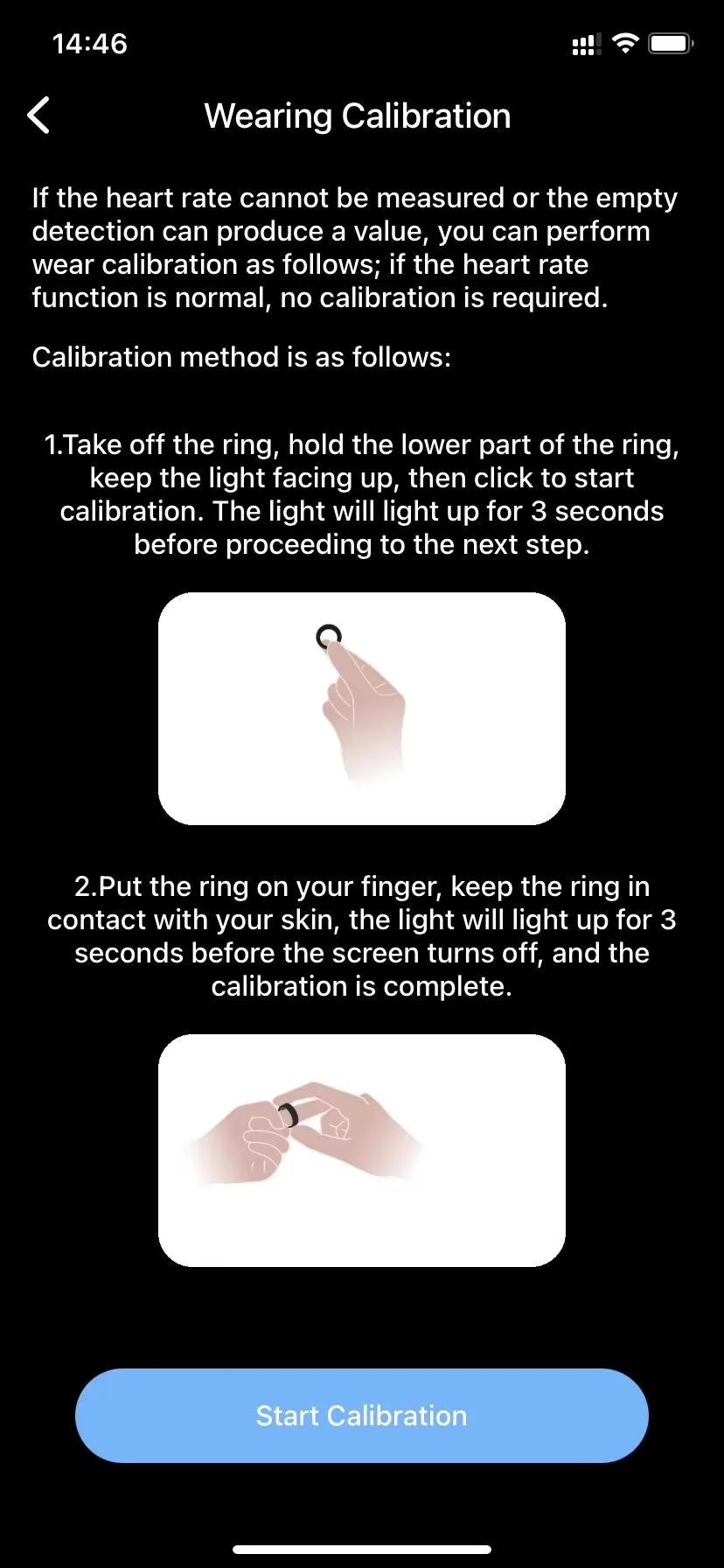
A. If the heart rate measurement cannot be performed or no values are displayed in idle mode, wear calibration can be performed as follows: If the heart rate function is working normally, no calibration is required.
Calibration Method:
- Hold the ring in your hand with the light facing up (see the image below). Then click on "Start Calibration." After the light has been on for 5 seconds, proceed to the next step.
- Put the ring on your finger and ensure that the ring is snug against the skin until the light goes out. This completes the calibration (see the image below for detailed instructions).
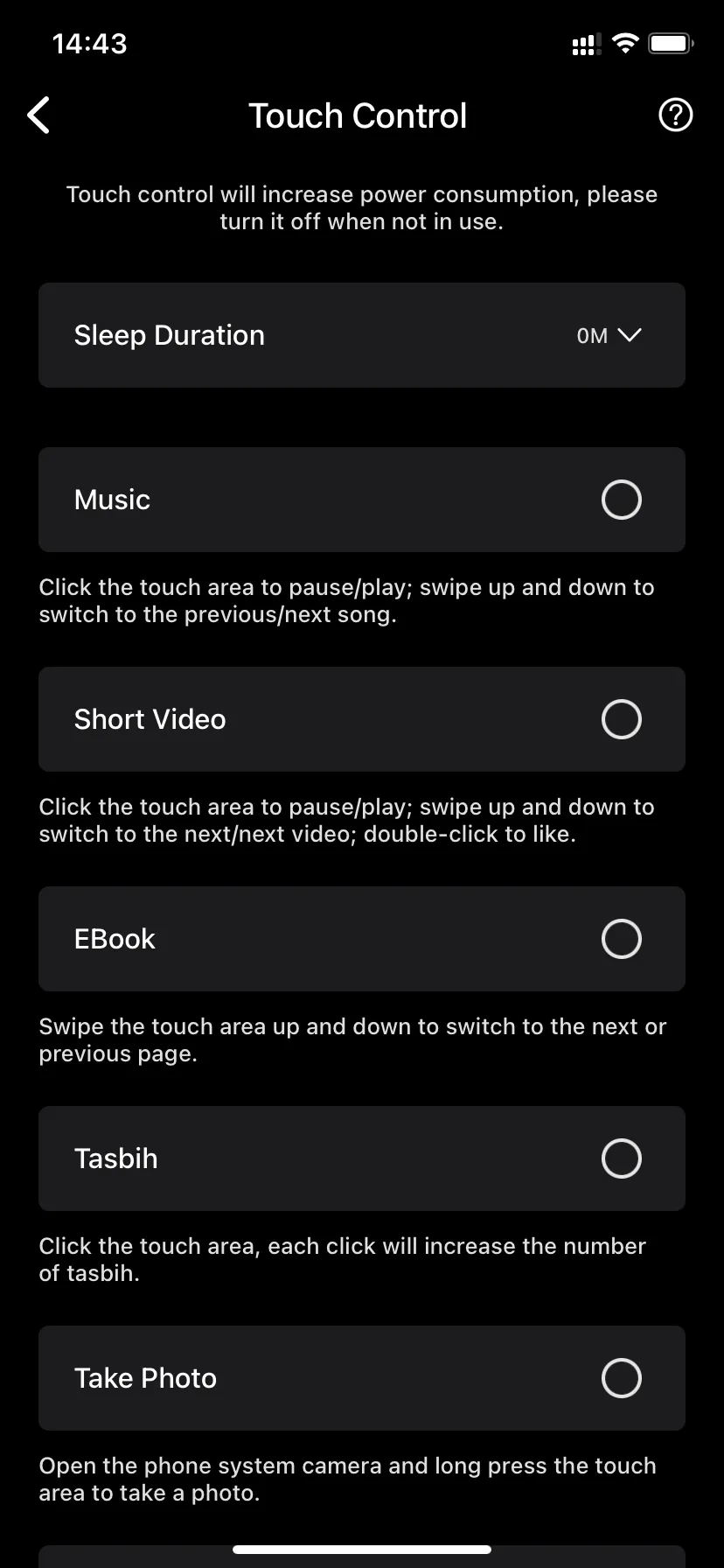
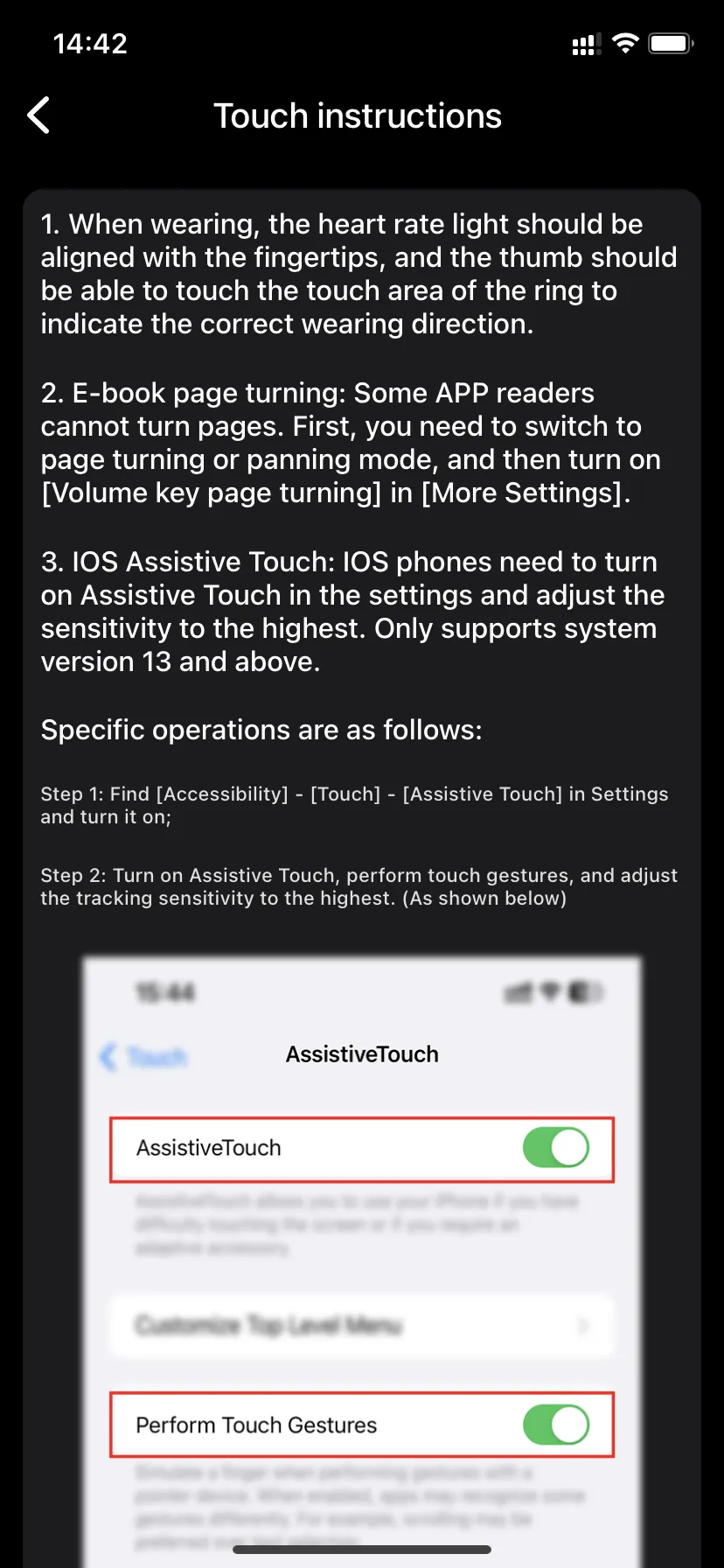
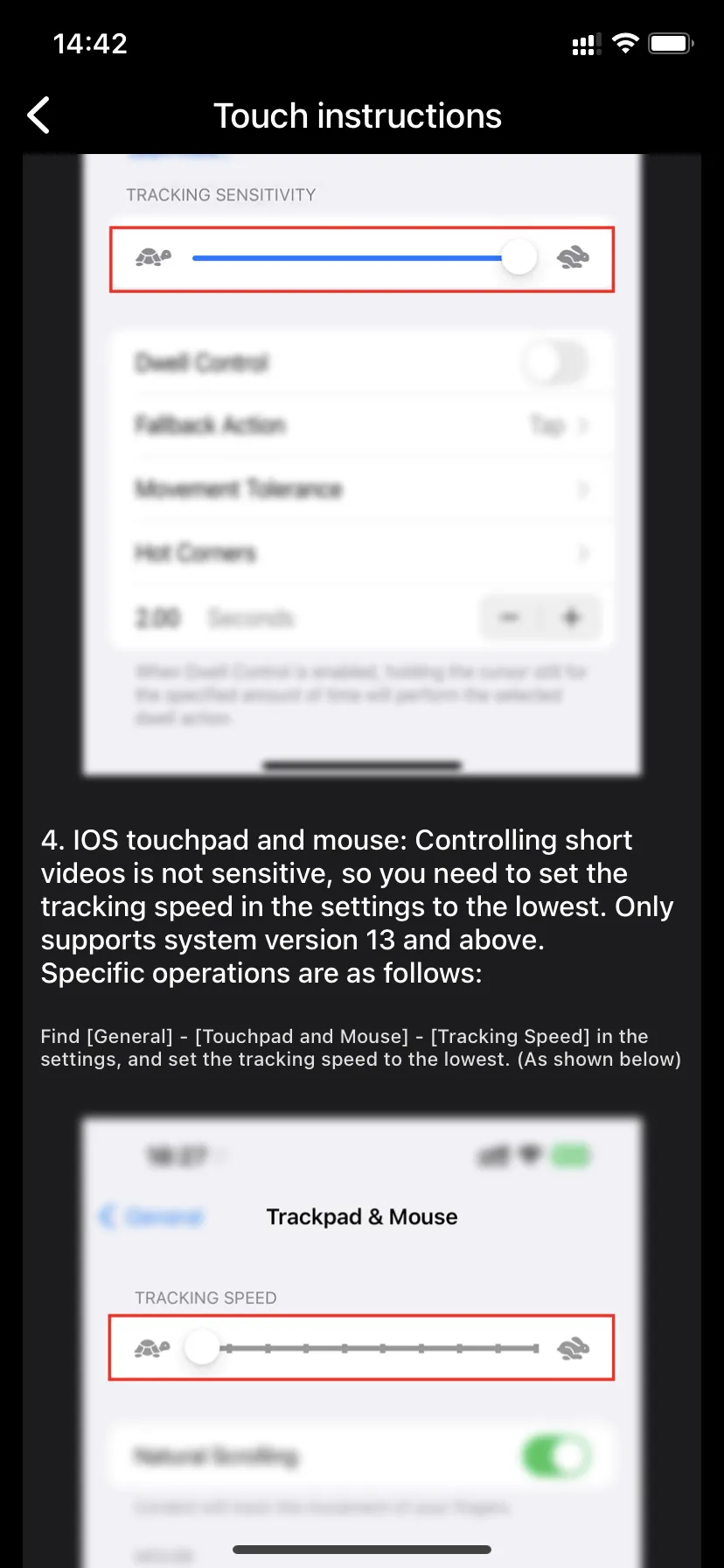
Q. Touch Control and Gesture Control
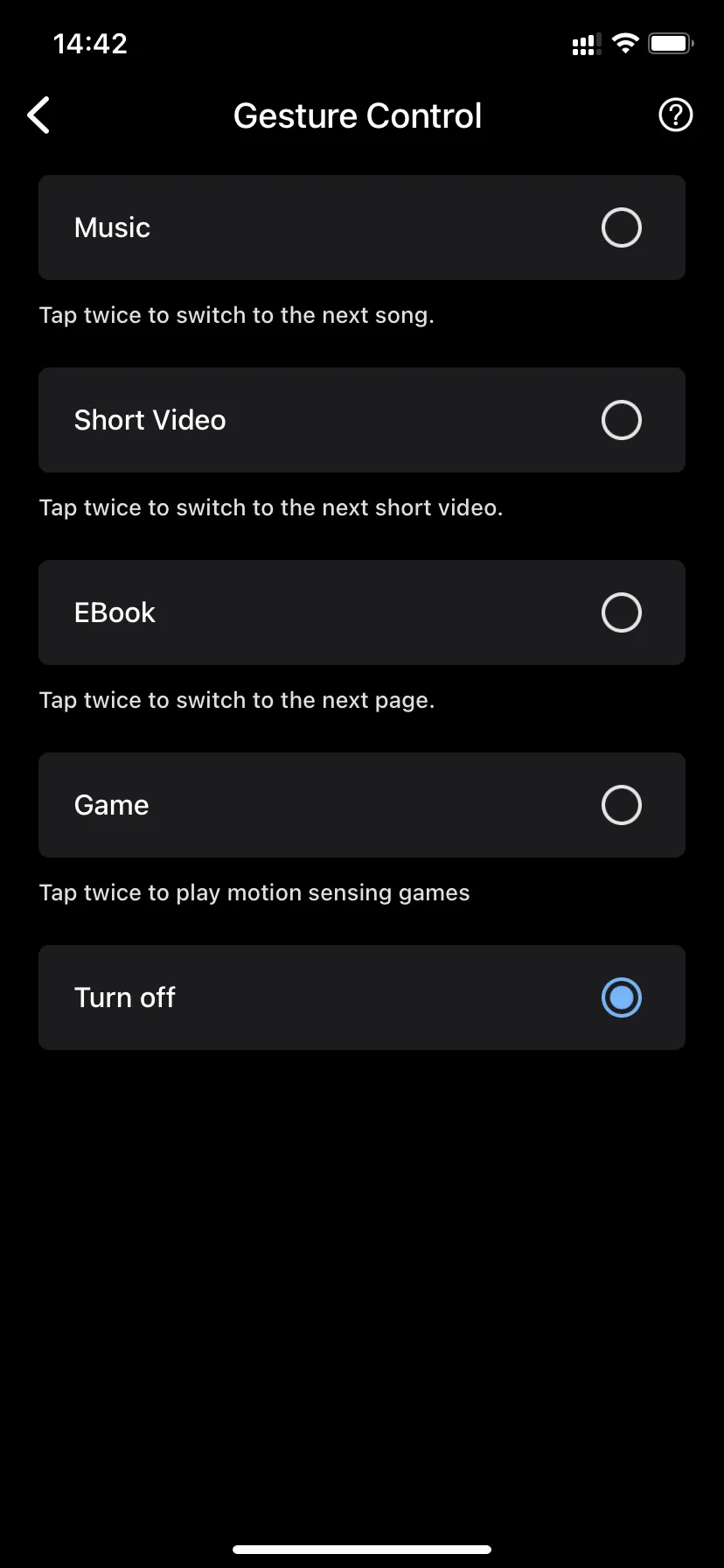
A. Activate touch control or gesture control
(Deactivate if not needed, as this will otherwise increase power consumption.)
On Android devices, simply select the desired setting.
On iOS devices, in addition to selecting the appropriate function settings, you need to perform the following steps:
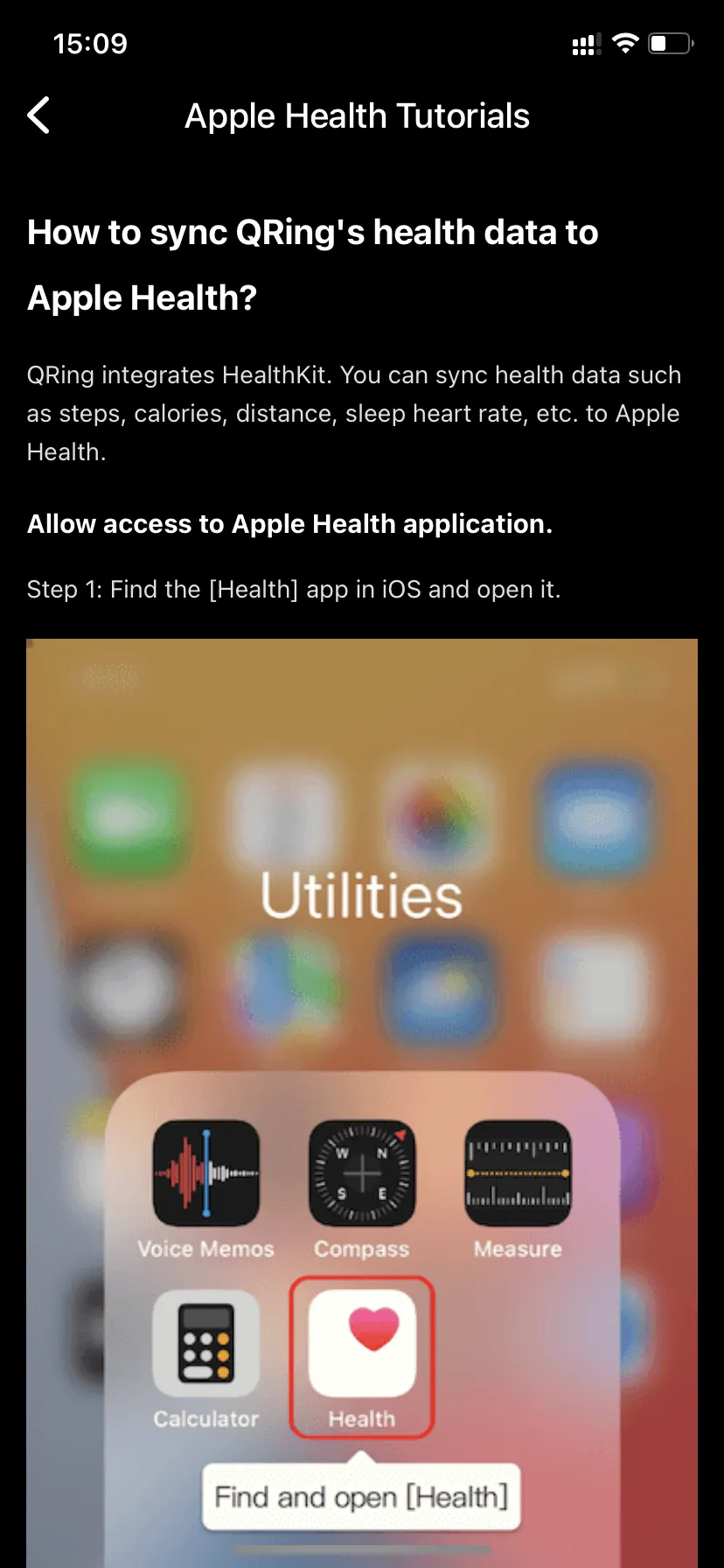
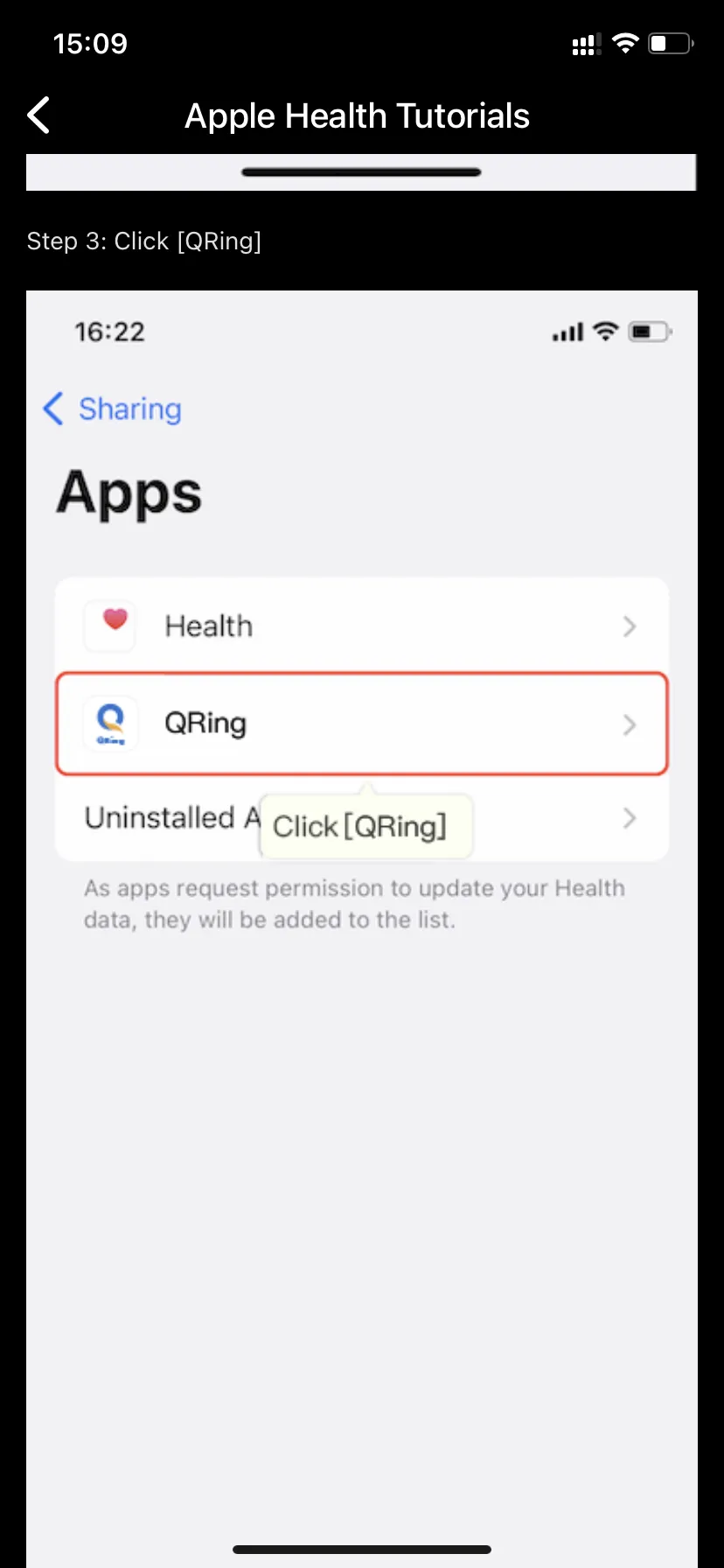
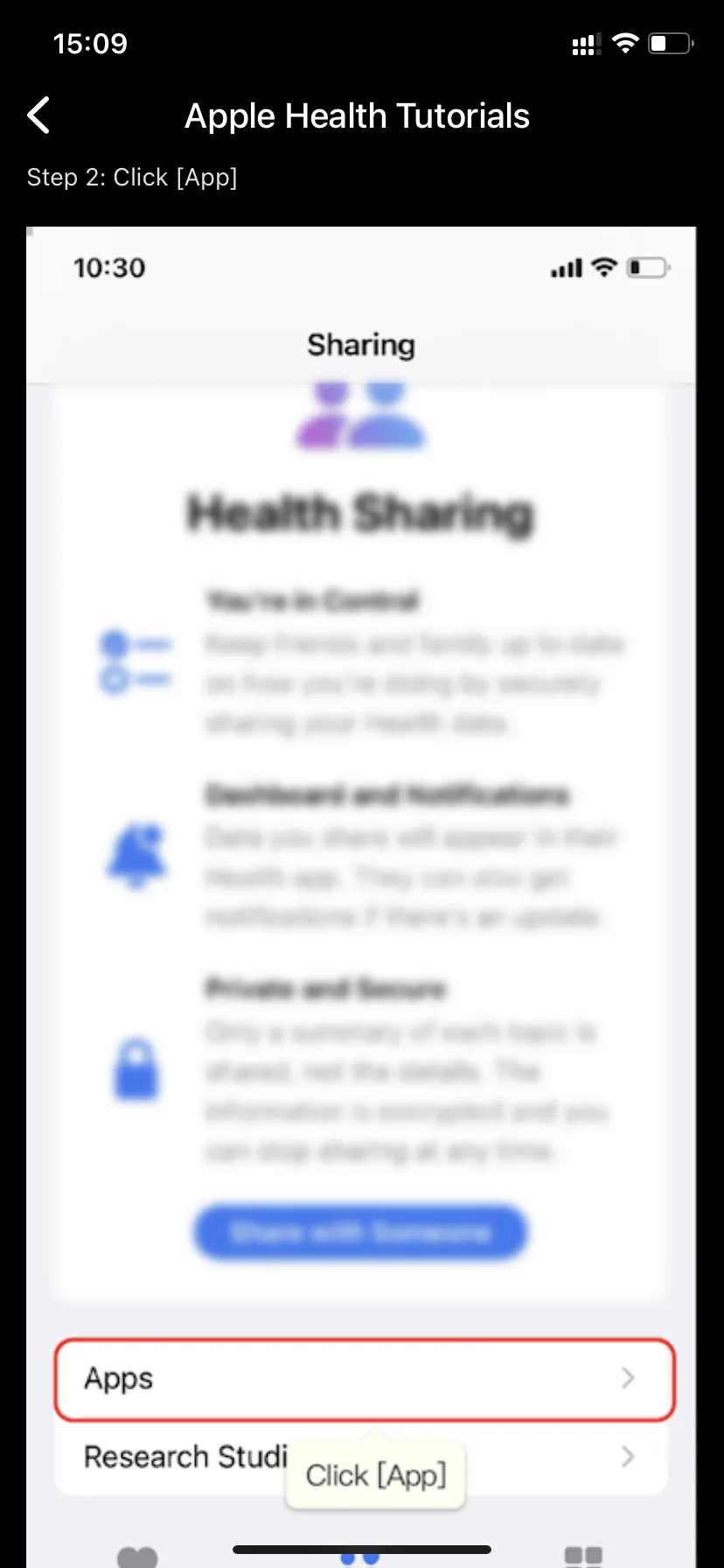
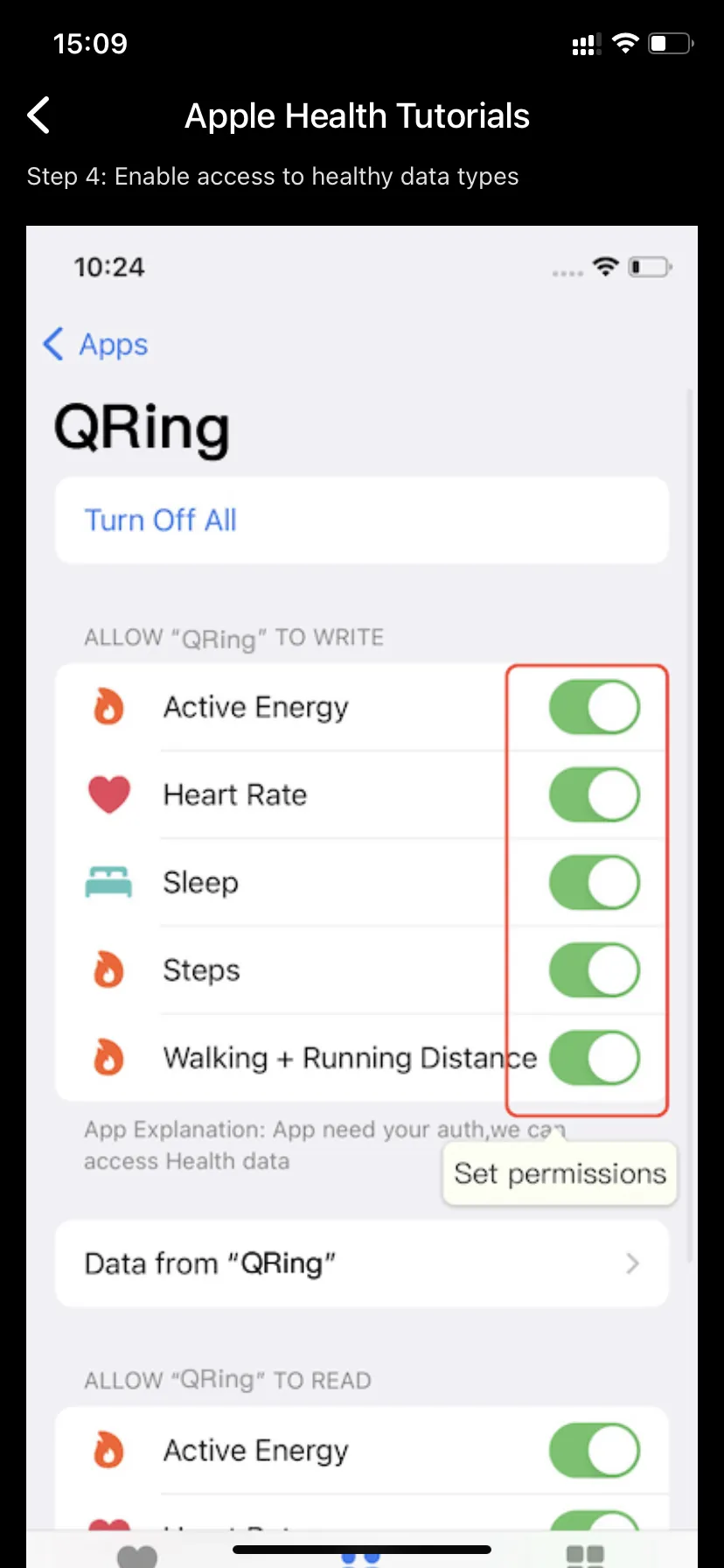
Q. How to sync health data from the Smart Ring with Apple Health?
A. You can follow these steps:
The smart ring is not a medical device and is not intended for diagnosing, treating, or preventing diseases. The data is for reference only.
Measurements may vary depending on how the device is worn, individual differences, and environmental influences. Please rely on your personal experience when evaluating the results.
Battery life may vary depending on usage frequency, sensor activity, ambient temperature, and other factors. The stated battery life is based on laboratory tests.