WiFi 6 Extender & Amplifier, Dual-Band, 2700 Mbps

EUR 79,00 €
EUR 109,00 €
Quantity
  • Chat with us

  • Secure payments

  • 14-day return policy

Why choose us

No router replacement required
Dual-band Wi-Fi 6 with speeds of up to 2700 Mbps
Supports 160 MHz channel bandwidth
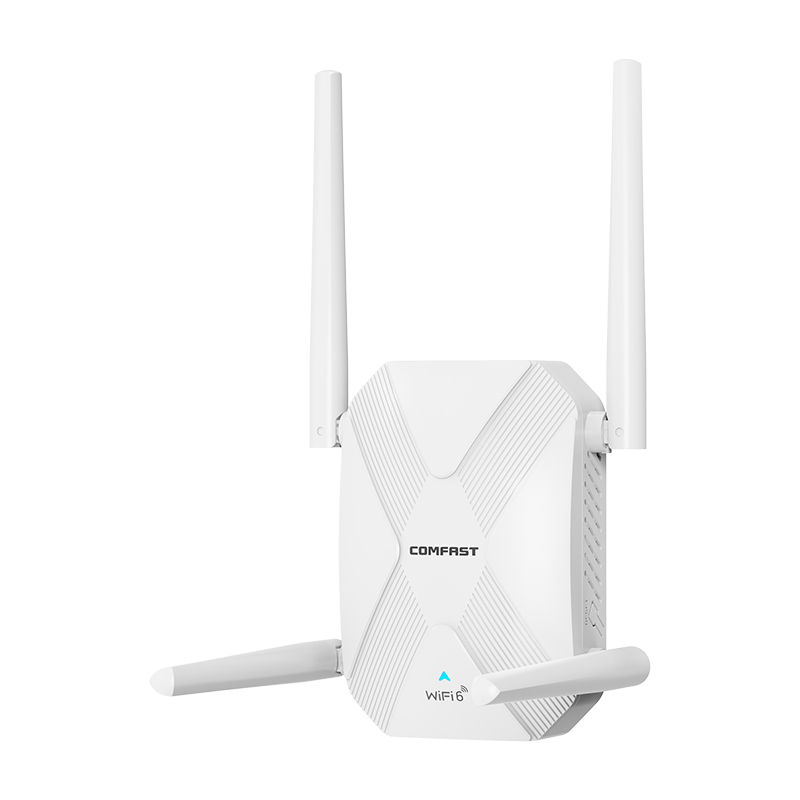
4 external antennas for a stronger signal
Triple-core processor for smooth performance
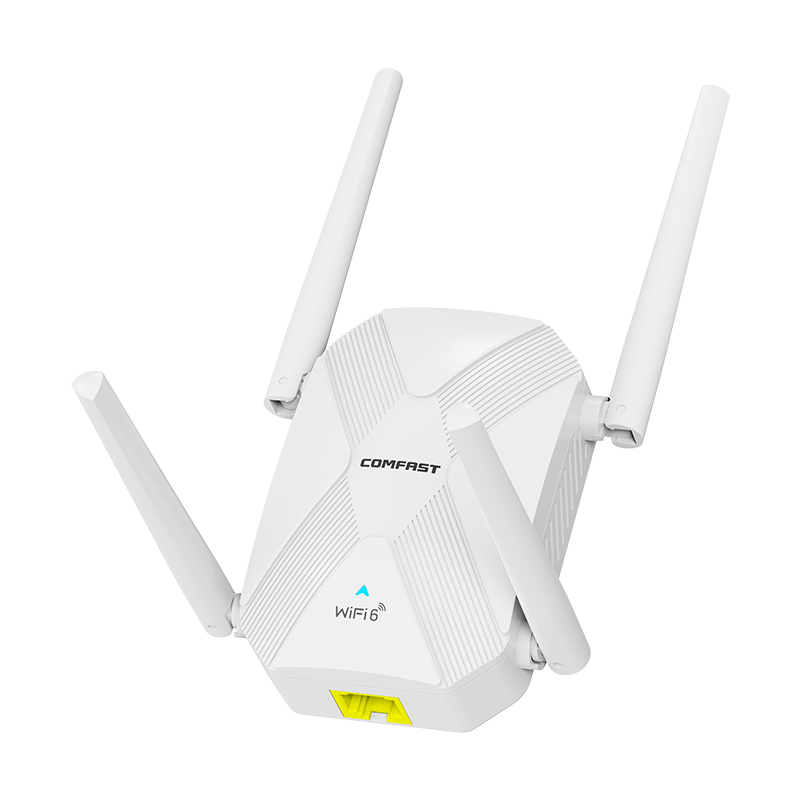
Gigabit Ethernet for fast wired connections
Efficient Wi-Fi for multiple devices
Flexible modes for different network configurations

Dual-band Wi-Fi 6 range extender

Extend your existing Wi-Fi coverage to additional areas of your home. Reduce dead zones in bedrooms, home offices, and other rooms. Coverage and performance may vary depending on the router, layout, and obstacles.

Dual-band speeds of up to 2700 Mbps

Enjoy a theoretical combined speed of up to 2700 Mbps, with up to 300 Mbps on the 2.4 GHz band and 2400 Mbps on the 5 GHz band. Choose the frequency band that best suits your devices and daily activities—from browsing and video calls to streaming.

Four external antennas

Four adjustable high-gain antennas ensure optimal distribution of the Wi-Fi signal throughout your home. Position them to suit your space and improve reception in areas where your router’s signal is weaker.

Extend your Wi-Fi to more rooms

Wi-Fi 6 range extension
GIGABIT PORT
Wall-penetrating antennas
Easy setup
Wi-Fi 6 range extension
GIGABIT PORT
Wall-penetrating antennas
Easy setup

160 MHz channel bandwidth support

Support for 160 MHz channels can help provide greater available bandwidth when used with compatible devices and network settings. Actual performance depends on your router, connected devices, and local Wi-Fi conditions.

Gigabit Ethernet port

The Gigabit WAN/LAN port supports wired connections of up to 1000 Mbps. Connect the extender to a wired network in Access Point mode, or use the port with a compatible wired device.

Flexible Wi-Fi extension with Gigabit Ethernet

Wired or wireless setup
Choose a wired or wireless connection to extend your existing network. Connect compatible smartphones, laptops, TVs, and other Wi-Fi-enabled devices in more areas of your home.
Gigabit Ethernet for faster wired connections
The Gigabit WAN/LAN port supports wired transmission speeds of up to 1,000 Mbit/s. Compared to a 100-Mbit/s Fast Ethernet port, it offers a higher potential connection speed for compatible devices.

Connect multiple devices

MU-MIMO and OFDMA technologies help the extender manage data for multiple connected devices. This enables smoother everyday use with smartphones, laptops, TVs, and other compatible devices.

Easy setup – No new router required

Connect the Wi-Fi repeater to a compatible router to extend Wi-Fi coverage throughout your home. After configuration, your network settings are saved automatically, so you generally do not need to configure them again after a restart.

Three flexible ways to extend your home network

1. Extend Wi-Fi to more rooms
Use Repeater mode to establish a wireless connection to your existing router and improve coverage in bedrooms, home offices, and other areas with a weaker signal.
2. Convert a wired connection to Wi-Fi
Connect the extender to your network with an Ethernet cable to create a Wi-Fi access point for phones, laptops, TVs, and other compatible devices.
3. Connect wired devices to your Wi-Fi network
Use the extender's Ethernet port to connect compatible PCs, smart TVs, and other wired devices to your existing Wi-Fi network—without having to run a cable to your main router.

Ventilated design for stable operation

Precisely positioned ventilation openings promote airflow and heat dissipation during use, helping to support stable performance in daily operation.

WPA3 network security

WPA3 encryption helps protect your Wi-Fi network. The built-in ventilation openings ensure optimal airflow during operation.

Please note: The listed Wi-Fi speeds are theoretical maximum values. Actual speed and range depend on your internet service provider, router, device compatibility, distance, walls, and other sources of interference. A Wi-Fi repeater can improve Wi-Fi coverage but does not increase the speed of your broadband connection.

Product specifications

  • Wi-Fi standard : IEEE 802.11a/b/g/n/ac/ax, including Wi-Fi 6

  • Frequency bands : 2.4 GHz (2.412–2.472 GHz); 5 GHz (5.180–5.825 GHz)

  • Theoretical Wi-Fi speeds : Up to 300 Mbps on the 2.4 GHz band and 2,400 Mbps on the 5 GHz band; up to 2,700 Mbps combined²

  • Ethernet port : 1 × Gigabit RJ45 WAN/LAN port, 10/100/1000 Mbps

  • Antennas : 4 external antennas, 3 dBi each

  • Chipset : RTL8198D-VG1-CG + RTL8192FRH + RTL8832CR-VD

  • Memory : 128 MB RAM and 16 MB flash memory

  • Operating modes : Access Point (AP), Repeater, and Router modes

  • Controls and indicators : Reset button and tricolor LED indicator

  • Power supply : 220 V AC

  • Maximum power consumption : 9 W

  • Dimensions : 232 × 86,85 mm, including antennas; manually measured

  • Operating temperature : −10 °C to 40 °C

  • Storage temperature : −40 °C to 70 °C

  • Operating humidity : 10 %–90 % relative humidity, non-condensing

  • Storage humidity : 5 %–90 % relative humidity, non-condensing

The listed Wi-Fi speeds are theoretical maximum values. Actual speeds vary depending on the router, connected devices, distance, interference, and network conditions.

FAQ
1. What does this Wi-Fi repeater do?

It works with your existing router to extend Wi-Fi coverage to additional areas of your home, including rooms where the signal may be weaker.

2. Is it compatible with my router?

It supports the Wi-Fi standards 802.11a/b/g/n/ac/ax and is designed for use with most common Wi-Fi routers, including Wi-Fi 6 models. Compatibility may depend on your router settings.

3. What configuration modes are available?

Use Repeater mode to extend your router’s Wi-Fi wirelessly, or Access Point mode to provide Wi-Fi through a wired Ethernet connection. Compatible wired devices can also be connected via the Ethernet port.

4. What wireless speeds does it support?

The dual-band Wi-Fi 6 repeater offers theoretical combined speeds of up to 2,700 Mbps: up to 300 Mbps on the 2.4 GHz band and 2,400 Mbps on the 5 GHz band. It also supports 160 MHz channels with compatible devices and network settings. Actual speeds may vary depending on the configuration and environmental conditions.

5. Will this increase the speed of my broadband connection?

No. Although it extends Wi-Fi range, it does not increase the speed of your internet connection. A stronger signal in an area with weak Wi-Fi coverage can help provide a more reliable connection.

6. What area can it cover?

The product information indicates an approximate coverage area of 70–120 m². Actual range depends on your home’s layout, walls, building materials, router placement, and potential radio interference.

7. Can I connect wired devices?
Yes. The Gigabit WAN/LAN port supports connection speeds of up to 1,000 Mbps for compatible devices such as PCs and smart TVs. Actual speeds depend on the connected devices, the Ethernet cable, and the network.
8. Does it support network security features?
It supports WPA3 encryption to protect your Wi-Fi network. Available security features may depend on the settings and compatibility of your router and connected devices.
9. Do I need to set it up again after switching it off?
Your settings are saved automatically, so you generally do not need to configure them again after a power outage. However, setup is required again after restoring factory settings.
10. Is one extender enough for a large house?
Coverage depends on the size and layout of your home. In larger homes, multi-story buildings, or rooms separated by thick walls, an additional extender may improve coverage.
11. Do I need to replace my existing router?
No. The Wi-Fi repeater is designed to work with a compatible existing router and extend wireless coverage without requiring you to replace your broadband equipment.
12. Does it work with routers from TP-Link, ASUS, or Virgin Media?

Yes, the repeater supports common Wi-Fi standards, including Wi-Fi 4, Wi-Fi 5, and Wi-Fi 6. Compatibility with individual router models and settings may vary. Please contact us if you would like to check compatibility with a specific router before purchasing.

Cart

loading